 SimplePOS
Business types
Pick your business type when you sign up — you get the screens, fields and ready lists made for it.
Your business, your setup
Pick your business type when you sign up — you get the screens, fields and ready lists made for it.
🇵🇰 Optional for PakistanFBR integrationPOS Integration and Digital Invoicing — FBR invoice number and QR on every receipt↓Grocery & General Store
Grocery stores, convenience stores, supermarkets and marts.
- Fast POS with barcode scanning and receipts
- Stock, purchases and suppliers
- Customer accounts and credit
- Accounts, profit and daily reports
- Loose items by weight (kg)
- Low-stock alerts and reorder list
Pharmacy & Medical Store
Medical stores, chemists and hospital pharmacies.
- Starter list of common medicines to import
- Search by brand or generic (formula) name
- Sell by strip, box, bottle or vial
- Rx-only and controlled-drug warnings
- Fast POS with barcode scanning and receipts
- Stock, purchases and suppliers
Garments & Shoes
Clothing, boutiques, footwear and fabric shops.
- Sizes and colours (variants) with their own stock
- Barcode per size / colour
- Exchange and returns
- Fast POS with barcode scanning and receipts
- Stock, purchases and suppliers
- Customer accounts and credit
Auto Parts
Car and motorcycle spare parts, lubricants and accessories.
- Part number and OEM number on every item
- Fits: make, model and year (e.g. Corolla 2015-2020)
- Replacement / alternate parts offered when out of stock
- Rack and shelf location
- Search by part no., brand or vehicle
- Fast POS with barcode scanning and receipts
Bakery
Bakeries, cake shops and bakers.
- Sell by weight (kg / lb) or by piece
- Shelf life on every item
- Starter list of bakery items
- Fast POS with barcode scanning and receipts
- Stock, purchases and suppliers
- Customer accounts and credit
Sweets & Confectionery
Sweet shops, confectioners, chocolates, dry fruit and snacks.
- Sell by weight (0.25 kg, 0.5 kg, 1 kg…)
- Gift boxes and mixed boxes
- Starter list of sweets and snacks
- Fast POS with barcode scanning and receipts
- Stock, purchases and suppliers
- Customer accounts and credit
Restaurant & Café
Restaurants, cafés, fast food, food courts and tea shops.
- Dine-in, takeaway and delivery orders
- Table setup by area (hall, terrace, private room…)
- Send orders to the kitchen (KOT)
- Kitchen screen: new → preparing → ready
- Running bills per table
- Customer accounts and credit
Mobile & Electronics
Mobile phones, accessories, computers and appliances.
- Brand, model and warranty on items
- IMEI / serial number on the bill
- Colours and storage variants
- Fast POS with barcode scanning and receipts
- Stock, purchases and suppliers
- Customer accounts and credit
Hardware & Paint
Hardware, sanitary, electrical, paint and building material.
- Rack / shelf location
- Loose items by weight or length
- Contractor accounts on credit
- Fast POS with barcode scanning and receipts
- Stock, purchases and suppliers
- Customer accounts and credit
Services
Salons, workshops, repair shops and clinics.
- Sell services and products together
- Customer history
- Customer accounts and credit
- Accounts, profit and daily reports
Multi-Business
More than one kind of business under one account.
- All industry features in one account
- Fast POS with barcode scanning and receipts
- Stock, purchases and suppliers
- Customer accounts and credit
- Accounts, profit and daily reports
FBR integration for businesses in Pakistan
Registered with FBR? Connect SimplePOS to FBR and every sale is reported automatically. Not registered, or outside Pakistan? Leave it off — the POS works exactly the same without it.
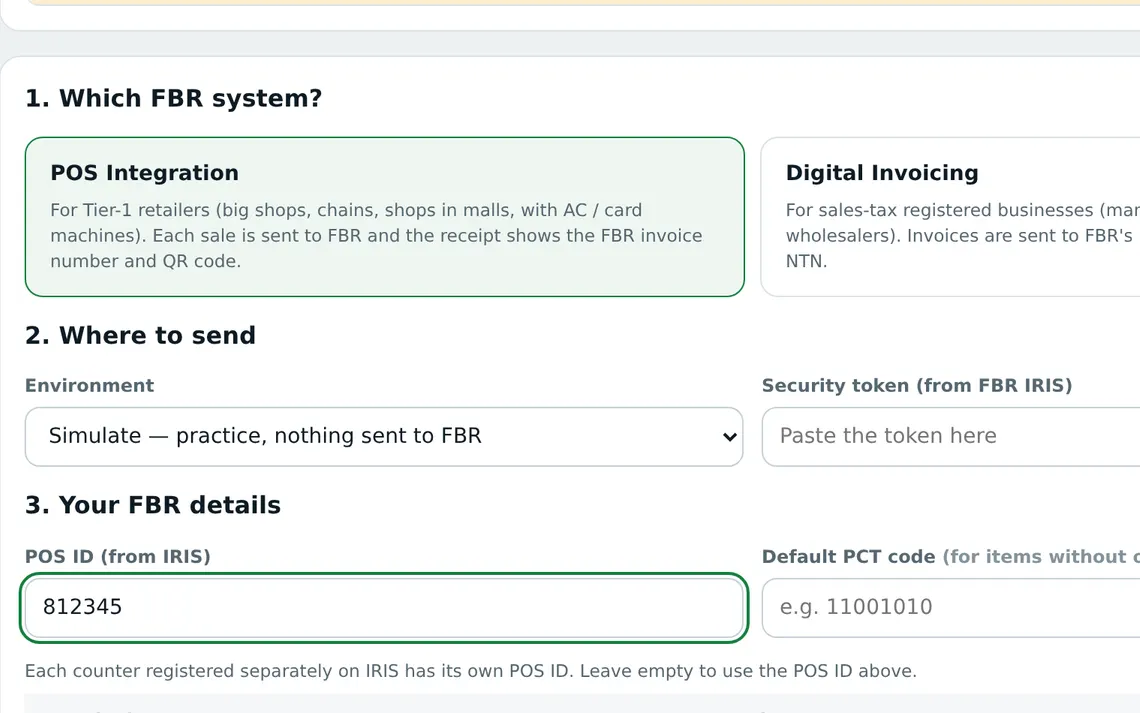
POS Integration
For Tier-1 retailersEvery sale is sent to FBR as it happens. The receipt shows the FBR invoice number and a QR code that customers can verify.
Digital Invoicing
For sales-tax registered businessesInvoices go to FBR Digital Invoicing with your NTN, HS codes and sales tax; the FBR invoice number is saved on each invoice.
- Works with or without FBR — switch it on when you are ready
- No internet? Sales are saved and sent to FBR automatically later
- Returns and voids can be sent as credit notes
- A separate POS ID for each till
- Practice mode and the FBR sandbox to test before going live
How to set it up
- Register with FBRRegister your business and your POS on FBR IRIS and get your POS ID (POS Integration) or security token (Digital Invoicing).
- Add FBR to your planMake sure the FBR module is included in your plan — ask us if it is not.
- Enter your detailsIn the app open FBR, choose POS Integration or Digital Invoicing and enter your NTN, POS ID or token.
- Test, then go liveTry it in practice mode or the FBR sandbox, then switch to Live. Each sale then gets its FBR invoice number.
FBR integration is only for businesses registered with the Federal Board of Revenue of Pakistan. Businesses in other countries do not need it and never see it. Need help with FBR setup? Talk to us →